01
Choose your connection
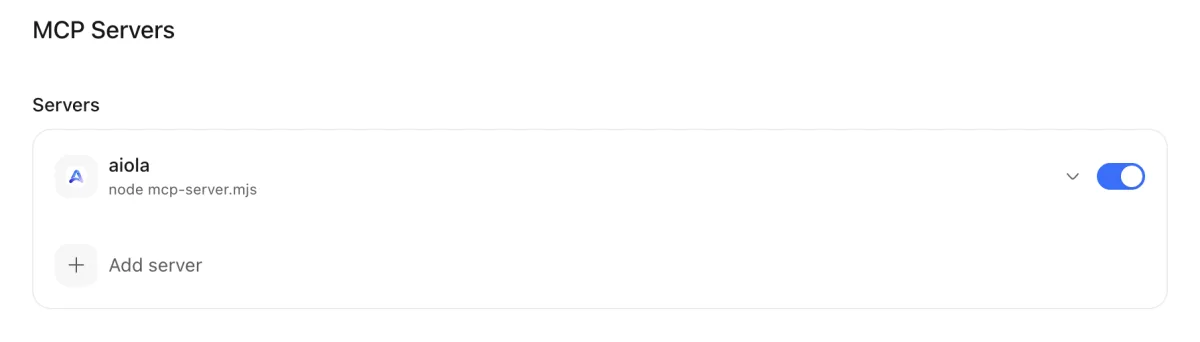
Agents need access to the tools and data behind your question. Configure workspace servers in Settings, under MCP Servers, or find hosted details in Central Settings.
Aiola MCP
Assistants cannot investigate without access to your project evidence. Aiola connects workspace MCP tools and gives compatible clients hosted analytics, errors, and feedback through OAuth. Ask questions with the relevant data in reach.
01
Agents need access to the tools and data behind your question. Configure workspace servers in Settings, under MCP Servers, or find hosted details in Central Settings.
02
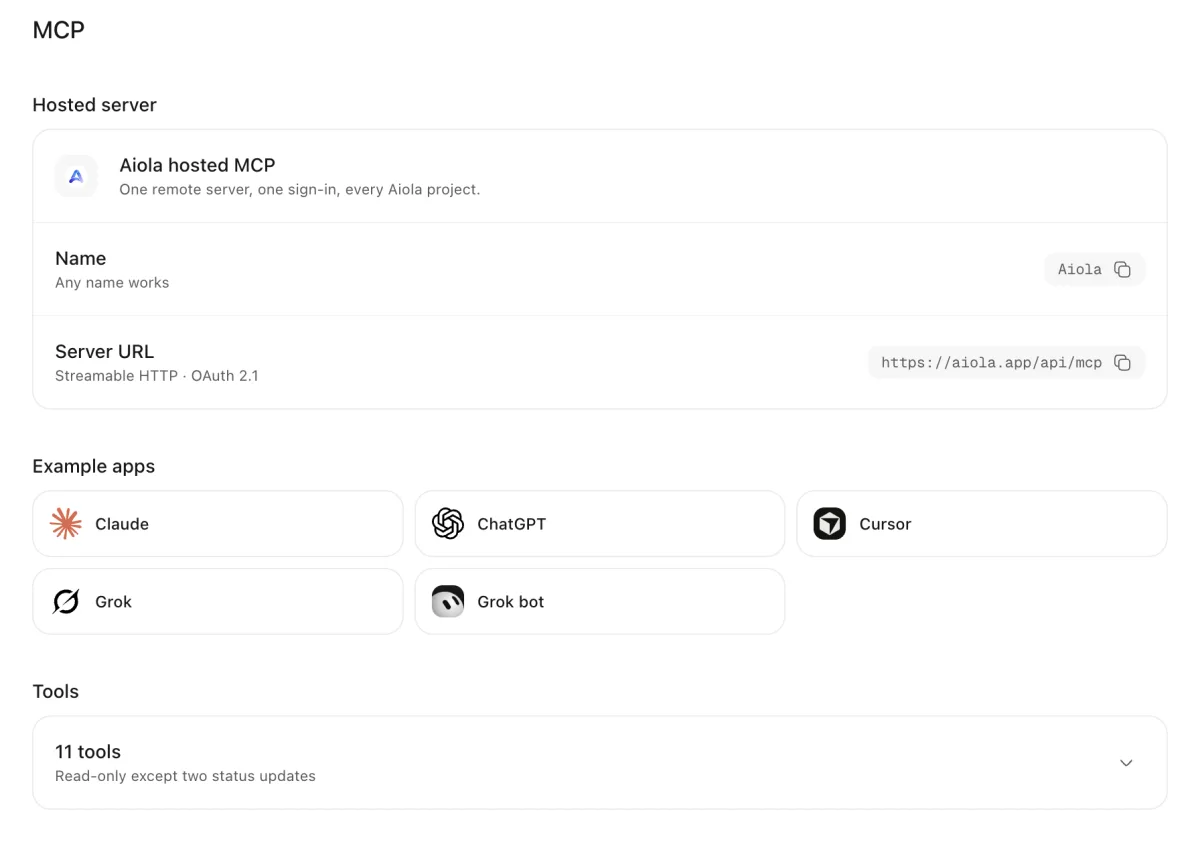
Different assistants need different connection methods. Add a named stdio or HTTP workspace server, or connect an OAuth-capable client to hosted MCP.
03
An agent needs the right tools and project before investigating. Expand enabled workspace servers for tools; hosted connections use list_projects to find project data.
Your project may depend on tools outside Aiola. Add a named JSON configuration with a command and arguments for stdio or a URL for HTTP.
Unused integrations should not stay active in a workspace. Toggle servers or remove third-party entries; the built-in Aiola row has no delete action.
A configured server may still fail to expose tools. Expanded rows show tool names, descriptions, discovery progress, empty results, and connection errors.
A missing bridge prevents access to Aiola tools. Install Aiola MCP Server creates the connection for the selected workspace.
Reports are easier to inspect beside the conversation. Aiola’s local html_render tool displays HTML reports and visualizations inside threads.
External assistants need authenticated access to project data. Copy the hosted URL from Central Settings and connect through Streamable HTTP with OAuth 2.1.
Plain text can make analytical results harder to explore. Supported Claude and ChatGPT connections display interactive Aiola panels and charts beside tool results.
The wrong project produces irrelevant answers. list_projects lists accessible projects; one resolves automatically, while multiple projects require a case-insensitive name.
Agents need evidence behind traffic questions. Hosted tools return overviews, focused metrics, metric definitions, bot queries, and saved funnel results; device-local goals remain unavailable.
Search problems need data from your connected search services. Query Google Search Console and Bing keywords, page metrics, indexing issues, and crawl issues.
An investigation needs the original failure or user report. Hosted tools read log groups, events, stack traces, breadcrumbs, context, issues, and feature requests.
Records need updating after an investigation. Hosted writes change statuses through update_app_log_status for up to 100 identifiers or update_feedback for one item.
Request details can contain sensitive values. Log event reads omit requests and redact by default; include_request_data returns stored rows without MCP redaction.
Automated investigations need predictable request limits. Hosted calls share 120 weighted units per minute and 2,000 daily; analytics also checks period usage.
Reading code alone may not reproduce a browser failure. Local tools inspect pages, capture screenshots, click, type, scroll, and read console messages.
Your assistant cannot see the evidence behind your question. Hosted MCP connects compatible clients to project analytics, App Logs, and Feedback through OAuth. Resolve the project before asking detailed questions.
Each repository needs a different set of external tools. Workspace MCP Servers stores named stdio or HTTP connections. Enable the servers needed for that workspace and inspect their discovered tools.
A text answer makes a complex result hard to inspect. Interactive results show panels and charts in supported Claude and ChatGPT connections. Local HTML reports display visualizations inside Aiola threads.
Reproducing a browser issue requires more than reading source. Local browser tools inspect pages, capture screenshots, click, type, scroll, and read console messages. They require an Aiola desktop window.
An investigation should leave records ready for follow-up. Hosted status updates change log groups or feedback records. Other hosted tools read project data, with log request redaction enabled by default.
Local server configuration belongs to the selected workspace. Hosted tools use the authenticated account and resolved project.
Supported statuses are open, in_progress, human_review, closed, and ignored. Closing an App Log group sets its resolution timestamp. Other statuses clear it.
Hosted MCP needs Pro or the 7-day trial.
See the connection guide for client setup and the workspace MCP documentation for local configuration.

Errors, user feedback, GitHub and analytics live next to your coding agents in one desktop app. Every issue becomes a task an agent can take.