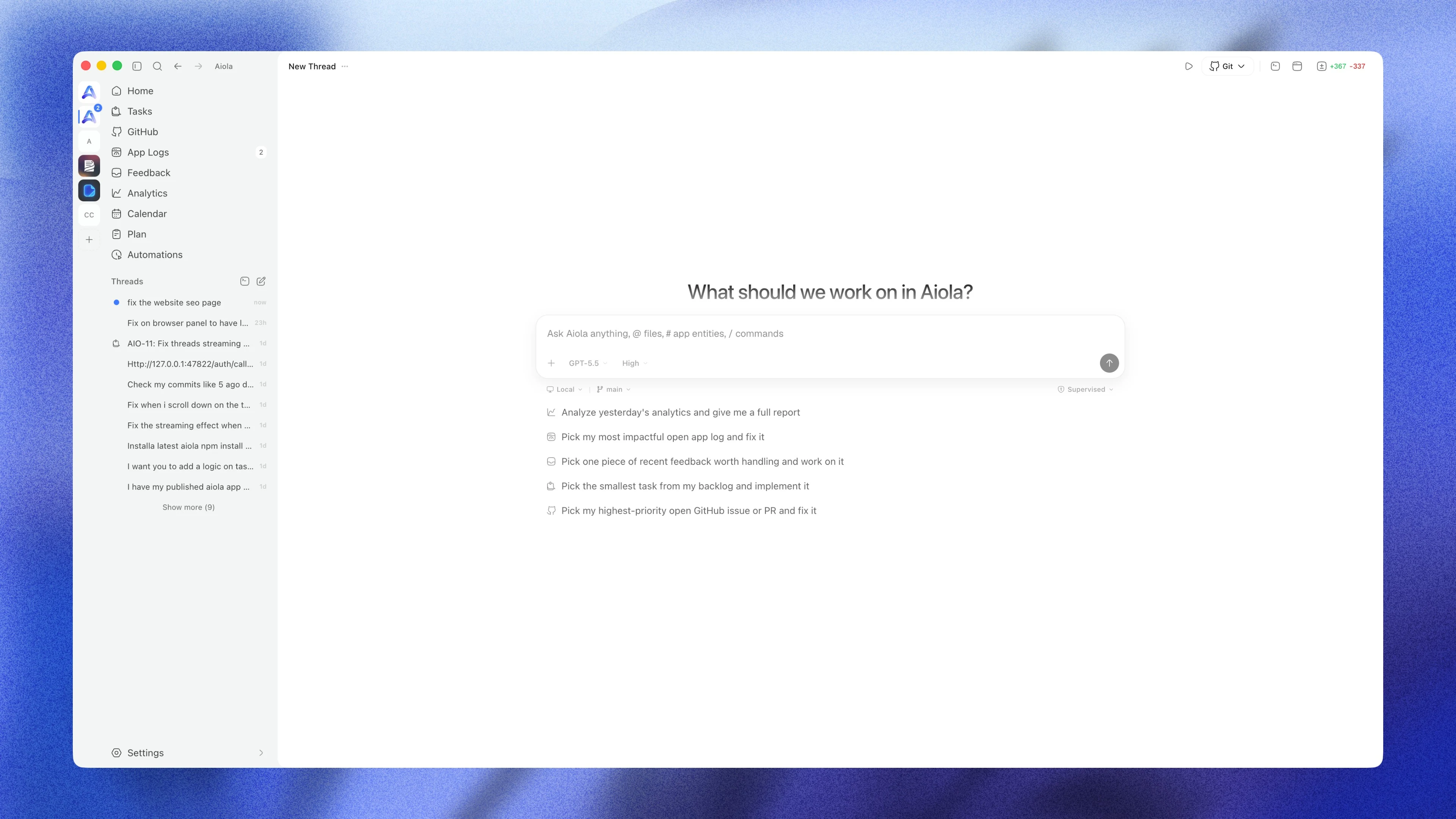
October 30, 2026 · v2.0.9
Queued messages can steer the agent mid-turn, threads resume on their own when a usage limit resets, and agents can drive the built-in browser and render HTML previews. Antigravity returns alongside Cursor's SDK and OpenCode 2, permission modes match each provider, models load instantly, and every tool step shares one compact row.
What's New
- Steer a running reply: A message you queue while the agent works has a Steer button. Press it and Claude, Codex or OpenCode 2 takes the message into the current turn instead of waiting for it to finish. Your message appears above the reply it changed, on desktop and on the phone.
- Resume after a usage limit: When a provider hits its limit, the thread shows when it will resume and picks up on its own shortly after the reset, even after a restart. Retry now and Cancel sit on the same banner, and queued messages wait instead of failing one by one.
- Agents can drive a browser: Agents can open pages in the built-in browser, read them, take screenshots, click, type, scroll and wait for content. A soft glow around the page shows when the agent is in control, and your own input always wins.
- HTML pages in chat: Agents can render reports and visualisations straight into the conversation, with Reload, Full screen and the raw result. Tools that return an app preview show it the same way. Works on the phone too.
- Open subagent conversations: A task card can open the subagent's own conversation, with its instructions, replies and tools, read-only.
- Math and diagrams: Formulas render properly and Mermaid diagrams render as diagrams, with a Show code toggle.
- Images, audio, video and files in messages: Messages show image galleries, inline players and named files with their size.
- Reopen closed tabs: Cmd/Ctrl+Shift+T brings back a closed browser, terminal, Review, Files or GitHub tab, and the whole panel layout (tabs, order, width, browser URLs) survives a restart.
- Terminals keep their output: Terminal output is still there after you reopen a thread or restart Aiola, and an exited shell offers Restart.
- Save a plan to Notebook: A proposed plan can be saved into the project's Notebook in one click.
- Usage for every provider: Settings → Usage shows the limits each provider reports, including Antigravity's Gemini and Claude/GPT pools, OpenCode Go and, if you switch it on, Cursor account usage.
Providers
- Antigravity is back: Install Google's agent from Settings → Providers, sign in with Google, and use its own models, slash commands, project skills, approvals and images. Each Aiola account gets its own profile.
- Cursor runs on its official SDK: Sign in with Cursor inside Aiola. Models and options follow your Cursor account, the full transcript shows (commands, edits, searches, images, plans) and errors are explained. Older Cursor threads keep working.
- OpenCode 2: Aiola now uses OpenCode 2, with its own model and skill lists, permission rules and plan agent. Dropped event streams reconnect and catch up. Older OpenCode versions get a clear upgrade message.
- Claude: Adds Claude Sonnet 5.5, Haiku 5.5 and Opus 4.5. New chats default to Opus 5.5. Ultracode and Ultrathink effort where the model supports it. Large attachments are explained before they fail, and big edits no longer stall streaming.
- Codex: Models and options come from Codex itself, each model uses its own default effort, Plan mode switches inside the same conversation, Codex questions and forms become cards, and token counts no longer inflate on resumed threads. Codex tools no longer fail to start with a database error.
- Grok: Supervised, Auto and Full access with real approvals in Supervised, conversations survive a resume, and skills work as native commands.
- Permission modes per provider: Supervised, Auto-accept edits, Auto and Full access each have a one-line description, and each provider only lists the modes it can really run. If a saved mode can't run, Aiola shows what it used instead. Each workspace keeps its own default mode, and Cmd/Ctrl+Shift+A cycles modes.
Improvements
- Faster threads: Long threads load what's on screen first, big diffs and tool outputs load when you open them, and the sidebar and Central update in small pieces while other threads stream.
- Clearer turns: A running turn shows one "Working for Ns" row. A finished turn folds its steps under "Worked for Ns" (or "You stopped after Ns") and keeps the answer and any warnings visible.
- One look for every tool step: Commands, edits, searches, tasks, MCP calls and previews share one compact row that opens into a scrollable body. Searches show every query and grouped results. Task cards show their state and time. HTML and images open in a centred full-screen window.
- Simpler approvals: Approvals offer Allow once, Allow for session and Deny, and can show the affected files and a coloured diff.
- Simpler questions: Question cards are compact and wrap long answers. Fixed-choice questions have no free-text box.
- Changed files: Long lists show five files with Show more, every file keeps undo and reapply, and Open diff jumps to that file in Review.
- Sidebar shows what needs you: Chats waiting for approval or an answer, failed and running chats stay at the top, with clear status and hover cards.
- Better chat formatting: Task checkboxes, footnotes, strikethrough, all heading levels, in-app thread links, skill chips and citation markers. Code and diffs scroll sideways instead of wrapping.
- Plans: Plan cards show a Markdown preview with Implement, Implement in new chat, Copy and Save. Earlier revisions fold away.
- Providers page: Shows each provider's real install path (shortened in the middle, full path on hover), what is wrong when a provider isn't ready, and no Sign out button.
- Models appear instantly: Model lists are cached and refresh in the background, so a new thread never waits for providers, on desktop or phone.
- Provider updates: Updating a CLI uses the installer it came from (Homebrew, npm, pnpm, bun, Volta, its own updater, Scoop or winget), checks the new version afterwards, and records failures in App Logs.
- Message times: Hover a message to see when it was sent, with duration and cost for replies.
- Setup prompts: Analytics, Stripe, App Logs and Feedback setup pages have a Copy prompt button.
Fixes
- No surprise sign-outs: When the local server can't check your sign-in, Aiola shows a Retry banner instead of looping, small clock drift is tolerated, and paid accounts are no longer bounced to the paywall on a slow start.
- Queues never get stuck: A finished, failed or stopped turn always releases the next queued message, and fast sends no longer leave ghost bubbles.
- Stop stays stopped: Late output after Stop keeps steps Cancelled, and provider processes are cleaned up.
- Accurate changed files: A turn only lists files the agent changed, not your own edits or pulled commits.
- Approvals: A failed approval ends visibly, finished turns no longer look like they wait for approval, and approving one command never approves a different one.
- Terminals stay live: A slow viewer no longer freezes the shell, and reconnects don't duplicate output.
- Browser: A crashed page offers Reload, a hung page says so, and a page that redirected while loading no longer shows a red error.
- GitHub: Pull request checks, reviews and merge state stay in sync.
- Chat: New messages stay in view after sending, expanded steps stay open while scrolling, images from tools show once, and failed edits show their error text.
- New chats: A new chat starts from the workspace defaults and always uses an installed provider.
- Analytics: Relative ranges roll over at midnight in the workspace time zone, presets no longer share the wrong cache, Google's Gemini Notebook crawler is recognised, and bot icons are fixed.
- Usage: Cards show loading, unavailable or failed states instead of a made-up zero, and times read in your local clock.
Phone
- iPad and dual-screen: Native iPad support with a split view (chat list beside the chat), a Duo action rail, and every screen adapting to rotation and width.
- Same features as desktop: Steer, usage-limit resume with Retry and Cancel, HTML pages, diagrams and math, attachments, subagent conversations, per-provider permission modes with short descriptions, and a new Usage page.
- Cleaner thread: Finished work folds under its duration, tool cards match desktop, diffs scroll sideways with line numbers, and approvals show files and diffs with Allow once, Allow for session and Reject.
- Chat list: Chats that need you come first, and the list stays visible while reconnecting.
- Fixes: Locked-Keychain reads no longer look like a sign-out, notification taps open the right chat once, notification approvals wait for your computer, messages go to the right computer, large drafts are kept safely, the startup cache stays small, and sign-in fits short and landscape screens.
October 20, 2026 · v2.0.8
Revenue bars stay on every analytics tab, renewals without a visit show as revenue-only rows, and "(unattributed)" rows and "Unknown client" bots are gone.
Fixes
- Revenue bars stay put: The purple revenue bar no longer disappears when you scroll a list or switch tabs, and now shows on every tab, including Referrer, Screen, Language, Region and City.
- Renewals are visible: A customer who renewed without visiting shows in Locations, Tech, Pages and Sources as a revenue-only row instead of being left out.
- No more "(unattributed)": Extension pings that were counted as page views are now recorded as custom events, and lists no longer show "(unattributed)" rows.
- Bots are named: Clients that are not browsers appear in Bot traffic under their real name, such as "Google Play link checker", instead of "Unknown client".
Improvements
- Clearer row details: Hovering any row in Sources, Pages, Locations or Tech shows visitors, views and revenue in one card that is never cut off.
October 15, 2026 · v2.0.7
Stop now ends a turn on every provider within three seconds, queued messages are held with Resume and Clear, and provider errors stay visible in the thread.
Fixes
- Stop really stops: Stopping a turn ends it on every provider within three seconds, including OpenCode 2 and SSH sessions that used to spin forever. The partial answer stays and the message is marked "Stopped", also after a reload.
- Stop keeps your queue: Messages queued behind a stopped or failed turn are held with Resume and Clear instead of being dropped or left stuck. A new message runs the held ones first.
- Error turns are visible: A turn that ends in a provider error (quota, crash, unresponsive CLI) shows the error line in the thread after reopening it instead of an empty reply.
- Automations and tasks stop cleanly: Stopping an automation run records it as skipped; stopping a task agent puts the task back to "to do" without marking it completed.
- Model defaults self-heal: A saved default or thread model that the provider has retired falls back to the provider's current default instead of failing the turn; Codex refreshes its roster on a fresh install.
- GitHub PR chat: Opening a pull request chat reuses the branch's worktree and no longer fails with a worktree error; a forced refresh shows when GitHub could not be reached.
- Usage cards: Grok reads its official billing endpoint, OpenCode Go reads the official usage endpoint (Zen pay-as-you-go shows no card), and Cursor no longer needs the sqlite3 tool, which also fixes the card on Windows.
Improvements
- Images from any provider: Screenshots and image files read by Claude Code, Cursor, Grok or OpenCode render inline in the thread, with full-screen preview, and on the phone.
- Automatic diagnostics: Provider and server failures are reported to Aiola, redacted, anonymous and grouped by provider and error type, so bugs get seen without you having to report them. Turn it off under Settings → General → Privacy.
October 13, 2026 · v2.0.6
Connections links to the Android app on Google Play; Cursor built-in skills show their descriptions; enabling analytics asks for the site domain; Windows gets correctly placed shell controls and a guard against drive-root workspaces.
Fixes
- Android app is live: Settings → Connections now links to the Google Play listing for the published Android app.
- Cursor built-in skills show their descriptions: Skill files that write the description as a YAML block (
>-, |+) rendered as a literal >-; the frontmatter parser now folds them. - Analytics setup asks for the site domain: Enabling analytics for a project takes the website domain up front, validates it, and shows the server's error instead of failing silently.
- Windows shell controls: The back/forward and sidebar buttons sit over the collapsed rail on Windows instead of being offset for macOS traffic lights, and the collapsed sidebar no longer clips them.
- Opening a drive root on Windows: Picking
C:\ as a project folder is rejected with a message instead of creating a workspace with an empty name. - Setup completion is recorded: "Continue" on the setup page waits for the completion record before navigating, so a fresh install no longer looks unfinished on the next launch.
- Sidebar unread badges: use the card background so they read on the flat shell.
Improvements
- Diff viewer worker: updated to the current
@pierre/diffs build.
October 13, 2026 · v2.0.5
OpenCode 2 is detected, authenticated and streams threads; CLIs are found wherever they were installed on macOS and Windows; the Skills page lists Claude, Cursor and OpenCode skills; Cursor threads show Cursor skills; OpenCode threads get the Aiola MCP tools.
Fixes
- OpenCode 2 is detected and works: OpenCode's 2.x line (Homebrew
opencode, npm @opencode/cli) reports opencode v2.x, speaks a new API and requires a server password, so Aiola 2.0.4 greyed the provider out with "Couldn't check login status". Aiola now recognises both lines, starts and authenticates the 2.x server, streams its tool calls, approvals and questions, lists its models, and shows an "OpenCode 2" badge in Settings → Providers. - Providers are found wherever you installed them: The desktop app, the local server and the diagnostics page now share one PATH resolver: your login shell on macOS and Linux (plus
launchctl), PowerShell on Windows, with Homebrew, npm, bun, nvm and Cargo locations appended as fallbacks. A freshly installed CLI shows up within 30 seconds without pressing Re-check. - Cursor no longer flips to "Not authenticated" on a stale session: The login check trusts
cursor-agent status and keeps the cached model list when the account email is missing. - The Skills page showed nothing for Claude, Cursor and OpenCode: Skills synced from claude.ai live one folder deeper (
~/.claude/skills/synced/…) and are now found; Cursor has its own section (~/.cursor/skills, a project's .cursor/skills, and Cursor's built-ins); OpenCode 2 skills are read from its server, since the old debug skill command is gone. - Skills in a Cursor thread: The
/ menu and the skills panel now list what the Cursor CLI actually loads (Cursor and Claude skills) and label them "Cursor" instead of "Claude". - OpenCode threads get the Aiola MCP tools: (app logs, feedback, tasks, analytics), as Claude Code, Codex and Cursor already did.
Improvements
- OpenCode updates through Homebrew: when that is how it was installed, instead of npm.
- Model lists refresh more reliably: OpenCode 2 reports an empty catalog for a few seconds after start; Aiola now waits for it instead of caching an empty list.
October 6, 2026 · v2.0.4
A small follow-up to 2.0.3: on a cold Windows start the diff viewer could give up before the local server answered and stay blank for the session. It now waits longer for its workers to start.
Fixes
- Diffs load reliably on slower Windows launches: On a cold start the diff viewer's workers could give up before the local server answered, leaving diffs blank for the rest of the session. The viewer now waits longer for its workers to start.
October 6, 2026 · v2.0.3
Signing out on one device no longer signs you out everywhere. The app shell is redesigned around a flat, Codex-style layout: the workspace rail stays visible even when the sidebar is collapsed, page content lives in its own outlined panel, and every toolbar shares one set of button states.
Fixes
- Signing out no longer signs you out everywhere: Signing out of the desktop app, the mobile app, or the website now ends only that device's session. Your other devices stay signed in.
Improvements
- A cleaner shell for working across many workspaces: The translucent sidebar is gone in favour of a flat, Codex-style layout: the workspace rail, the navigation pane and the page header share one surface, the page content sits in its own outlined panel, and collapsing the sidebar now keeps the workspace rail in view so you can switch projects without reopening it.
- One look for every toolbar: Header buttons, view switchers, filters and the date-range picker on every page now share the same resting, hover and active states, and native browser tooltips have been replaced by Aiola's own tooltip throughout the app.
October 5, 2026 · v2.0.2
Payments now appear on Central analytics charts, scheduled automations keep computers awake and resume after sleep, and failed plan checks or page loads no longer hide your project data.
Fixes
- Monthly plan rollovers no longer hide project data: On monthly rollover days, a failed plan check could show set-up screens instead of your project data. Aiola now keeps your last confirmed plan if a check fails, so a temporary problem cannot hide your data.
- A failed load no longer looks like "not set up": When Analytics, App Logs, Feedback, the project overview, or Central pages cannot load, Aiola now says so, retries on its own, and offers a Retry button instead of showing the set-up guide.
- Scheduled automations survive a sleeping computer: Aiola keeps the computer awake while an agent is working, and time spent asleep no longer counts as the agent being unresponsive. An automation run interrupted by sleep starts again by itself once the computer is awake.
Improvements
- Revenue on the Central analytics chart: Payments now appear as bars on the Central chart in each project's colour, with a revenue axis on the right and per-project revenue in the hover tooltip, so you can see revenue without switching to the Revenue metric.
September 23, 2026 · v2.0.1
Canvas terminals regain their translucent, blurred glass backgrounds, and Claude Opus 5.5 arrives with 1M context, fast mode, and the full reasoning range.
Fixes
- Canvas terminals look like glass again: The 2.0 release lost the translucent, blurred background on terminal windows in the canvas; they rendered as solid panels. The glass effect is back.
Improvements
- Claude Opus 5.5: The new Opus model is available in the model picker, with 1M context, fast mode, and the full reasoning range.
September 21, 2026 · v2.0.0
Aiola v2.0.0 delivers a whole-app redesign alongside a hosted MCP server that connects Claude, ChatGPT, and external assistants over OAuth. Workspaces gain setup health checks, analytics is rebuilt with dedicated AI-crawler tracking, Connections are noticeably sturdier, and a round of fixes lands across mobile, Windows, analytics, and git.
What's New
- A whole-app redesign: Aiola 2.0 has a refreshed look everywhere — the shell and sidebar, the chat composer with its new floating panels, settings, Central, and the analytics pages. Same workflows, cleaner and faster to read.
- Hosted MCP server: Connect Claude, ChatGPT, or any MCP-capable assistant to your Aiola projects over OAuth and let it read live analytics, app logs, feedback, search keywords, and indexing issues. Tool results render as interactive widgets right inside Aiola chat.
- Setup health for every workspace: A new "Needs attention" card checks that your analytics tracker and app logger are installed correctly and reporting, and tells you exactly what to fix.
- Rebuilt analytics with AI-crawler tracking: Flat, scannable sections, entry and exit pages, resilient geo, and a dedicated AI view of bot and crawler traffic by vendor with assistant coverage.
- Feedback gets its own settings page: Configure feedback collection from Settings → Feedback instead of a modal, next to App Logs and Analytics.
Improvements
- Connections are sturdier: Paired phones keep their presence across restarts, older mobile sessions are matched correctly, the "Other connections" section is gone, and pairing now works on Windows.
- Redesigned GitHub PR and issue views: Summary and Code tabs, reviewer lists, instant caching on revisit, merge controls, and a Disconnect PR action from the sidebar.
- Sturdier thread engine: Orphaned runs are repaired automatically, the queue pauses after a failed turn, and a live provider status replaces the generic "Working" shimmer — on desktop and on the phone.
- Review changes panel: File tree, smallest-files-first loading, and smooth collapse animations for files and folders.
- OpenCode skills and Codex approval persistence: , plus Continue with Apple on the desktop sign-in and a font smoothing setting.
- Docs refreshed: A public guide for connecting assistants to the hosted MCP server, plus an llms.txt index for AI tooling.
Fixes
- Mobile: Picked photos are never lost silently and their options are explained, broken images show a visible card, the terminal survives backgrounding, the queued panel stays one shade and compact, and mention chips are readable in dark mode.
- Windows: CLI updates, the Codex login probe, and Grok model discovery no longer fail on .cmd shims; OpenCode updates through npm; errors are ANSI-clean; the app no longer hangs on exit with a terminal open.
- Analytics: Chart axis spacing, a zero-filled 24-hour sparkline on the home page, geo fallback, bot vendor attribution and host checks, and cache correctness on Central.
- Git: The SSH origin probe no longer poisons the local origin lookup, and the changes panel shows the right staged state and full paths.
- Fixed a batch of smaller bugs across settings, navigation, and provider detection.
August 11, 2026 · v0.1.90
Aiola for iPhone arrived, paired from Settings → Connections, and Google's Antigravity CLI (agy) joined the provider picker with live model discovery.
What's New
- Aiola for iPhone: The Aiola mobile app is available on the App Store. Pair your iPhone from Settings → Connections and take your workspaces with you — chat with your agents, watch threads stream live, answer questions.
- Antigravity provider: If you have Google's Antigravity CLI (
agy) installed, it shows up everywhere you pick an assistant — chat, agents, automations, tasks, and workspace defaults — alongside Claude Code, Codex, Cursor, Grok, and OpenCode. Gemini models come with a High / Medium / Low reasoning selector, models are discovered live from the CLI, and login status appears in Settings → Providers. - Cloud projects management: A new surface lists every cloud project linked to your account and lets you inspect or delete them — including their analytics, app logs, and feedback data.
Improvements
- Provider login status is sturdier: A slow or busy machine can no longer make Claude Code or Codex briefly show as "not authenticated" — Aiola remembers the last confirmed login, reads Codex's account directly when the CLI is slow to answer, and honestly says "couldn't check" instead of guessing.
- Analytics dashboards recover from hiccups: Rate limits and network failures now show a clear error with a retry button instead of an empty panel.
- Sharper code in chat: Upgraded syntax highlighting and markdown rendering for code blocks.
- The app recovers from UI errors gracefully: instead of taking the whole window down.
Fixes
- CLI updates no longer nag you twice: Updating a CLI from the banner used to re-prompt you two or three times after a successful install; the update is now verified once and the prompt goes away.
- Git changes panel tells the truth: Files modified only in your worktree no longer show as staged, file paths are no longer truncated, and their diffs open correctly.
- Settings navigation polish: Opening "Set up mobile" and going back no longer hijacks the next workspace you click into the Connections page, and switching settings pages never triggers a full app reload.
- Fixed a batch of smaller bugs across settings, navigation, and provider detection.
July 23, 2026 · v0.1.80
Analytics now separates crawlers that fetch content for AI answers from bots indexing the web or collecting training data, and turns those signals into a deterministic AI Visibility Score. Broken-page tracking, AI referral reporting, and a local-subscription AI visibility automation show what assistants can find, recommend, and send back to your site. Grok CLI and OpenCode join the provider picker, while long chats gain jump navigation, live background-task status, and automatic completion replies.
What's New
- Bot traffic is now split by what the AI is actually doing — AI answers vs Indexing vs Training: The Bot traffic panel no longer lumps every crawler together. Each hit is now classified by purpose: AI answers (ChatGPT-User, Claude-User, Perplexity-User fetching a page live to answer someone's question — i.e. you're being cited right now), Indexing (Googlebot, Bingbot, and AI-search crawlers like OAI-SearchBot / Claude-SearchBot building their index), and Training (GPTBot, ClaudeBot, CCBot, Bytespider, Meta and friends crawling for model training). The split is exact for historical data too, and flows into the aiola MCP (
get_analytics → bot_crawls_by_category) and the analytics recap, so you can finally tell "AI is answering questions with my content" apart from "AI is just training on me." - See the pages AI crawlers ask for that don't exist yet: New broken-page tracking: when a crawler repeatedly requests a URL that 404s (say ChatGPT keeps fetching
/free-trial and it isn't there), that's a strong signal you should build the page — the AI already thinks it exists. Analytics now captures the HTTP status of each crawl and surfaces the 404s crawlers hit as a distinct list (get_analytics → bot_crawls_broken_pages), separate from your real crawl totals so it never inflates them. Enabled by a tiny addition to the server-side capture in Settings → Analytics → Add to App (a not-found handler beacon; the snippet and instructions are updated for every stack). - AI Visibility (AEO) — measure how often AI recommends you, run on your own AI: A new prebuilt "AI visibility check" automation asks the buyer-style questions people put to AI assistants ("best tool for X", "alternatives to <competitor>"), then reports whether your brand shows up, how prominently, your share of voice vs competitors, which sources got cited, and the exact questions where you're invisible (your content gaps). It runs on whichever assistant the automation uses — Claude Code, Codex (ChatGPT), or Cursor — so it uses the subscription you already have, at no extra API cost. Add it from the automations page under Analytics & insights, or from the new Automations button right on the analytics header (next to the live globe), which lists the analytics automations for the workspace and lets you enable them in one click.
- AI Visibility Score — a real, deterministic 0–100 number for how visible you are to AI: Aiola now computes an AI Visibility Score from data it already tracks — no guesswork, no external service, same inputs → same score. Five weighted components: crawl coverage of your popular pages by AI crawlers (30), AI-crawler breadth — how many distinct AI bots reach you (20), AI-answer referral volume — humans actually clicking through from AI answers (25), assistant breadth — how many different assistants send them (15), and discovery-file health — robots.txt / llms.txt / sitemap being fetched by bots (10). Zero traffic scores a clean 0 (never a blank or an error), and the formula is documented in code so the number is auditable. It rides the existing bot-traffic request (no extra query cost), reaches AI through the MCP (
get_analytics_overview), and the "AI visibility check" automation anchors on this computed score instead of asking the model to invent a percentage — the LLM adds the qualitative story (share of voice, content gaps), the score itself is math. - Grok CLI and OpenCode — two more coding agents you can run inside Aiola: If you have Grok CLI (
grok) or OpenCode (opencode) installed, they now show up in the provider picker everywhere you pick an assistant — chat, agents, automations, tasks, and workspace defaults — alongside Claude Code, Codex, and Cursor. Neither uses a bundled model list: Grok's models and reasoning options are discovered live from the CLI itself (currently Grok 4.5, with whatever models xAI adds next appearing automatically), and OpenCode auto-discovers the exact provider/model pairs your install exposes. Grok supports the same skills/automation flows as the other CLIs. Both appear in Settings → CLI tools with install/login/update actions, and Grok/OpenCode usage lands on the usage dashboard (SuperGrok credits for Grok; OpenCode Go spend from your local DB). - Claude Opus 5 — Anthropic's newest model, available everywhere you pick one: Claude Opus 5 joins the Claude Code provider in chat, agents, automations, tasks, and workspace defaults. It runs on a 1M-token context by default (200K still selectable from the model switcher), supports Fast mode, and exposes the full reasoning range up to Extra High — sent to the CLI verbatim, so the effort you pick is the effort that runs.
- Analytics splits into Traffic and AI — two focused tabs instead of one long page: The analytics dashboard now has a Traffic tab (visitors, sources, pages, the breakdown grid) and an AI tab (bot crawlers, AI assistant referrals, discovery files, page coverage). The AI tab gets its own filters built for AI data — filter by bot, crawled page, or crawl purpose where Traffic filters by country/browser/OS — plus Crawled pages and Discovery files as tabs inside the bot panel. Both tabs share one date range, and the range you pick now sticks for the session — set "All time" once and it survives navigating away and back, instead of snapping to Today. Switching between the tabs reuses already-fetched data, so the second visit is instant with no loading flicker.
- AI Referrals — see when real people click through from an AI answer: A new AI Assistants card on the analytics dashboard tracks human visitors who arrived from ChatGPT, Perplexity, Claude, Gemini, Copilot, Grok, Meta AI, DeepSeek, Mistral, and similar — distinct from the bot-crawler hits in Bot traffic. It shows total referral visits, which assistant sent them, period-over-period deltas, and the landing pages they hit most. Loaded lazily so it never slows the default dashboard open; also available via MCP (
get_analytics → analytics_ai_referrals). - Chat navigation trail — jump through long threads without endless scrolling: A vertical tick rail now sits beside the message list: one tick per conversation turn (your prompt → the assistant's reply). Hover to preview the turn, click to jump straight there; the active tick tracks where you are as you scroll. Long threads compress to fit every tick on screen, macOS-dock-style magnification included.
- Background agent work now reports back on its own: When the assistant launches a background task (a long build, a
codex-run/grok-run dispatch), the session stays alive after the turn ends and a new reply arrives automatically when the task finishes — no more silent "I'll report back" dead ends. Spawned subagents and background tasks also show live status rows in the chat (running → completed, with expandable summaries). - Local file paths in chat are clickable: Bare or backticked paths (
/tmp, /var, /Users, ~/) render as chips that open the file on your Mac, same as in the terminal. - Model switcher redesign — one chip for model and reasoning effort: The chat composer no longer splits model and reasoning into two footer chips; a single switcher chip shows the model name plus your current effort level (and a ⚡ when fast mode is on). Open it for a compact panel: tap Models › to drill into the same provider→model list as before, pick a context-window pill when the model supports it, and drag a native-feeling effort slider whose fill color signals intensity — amber below Medium, blue from Medium through Extra High, red at Max/Ultra. Fast mode moved out of the [+] menu into the panel as a ⚡ toggle; when it's on the slider knob becomes a rocket with a flickering exhaust flame and ember stream, and turning it on plays a one-shot launch — ignition smoke at the pad, a subtle popover shake, then the rocket accelerating to its stop. Models with fast mode but no reasoning levels get the same panel with a full, non-interactive slider; models with neither keep the plain model list. Applies everywhere the chat composer appears.
Improvements
- The new bot dimensions reach the MCP and AI recaps:
get_analytics_overview now includes the Answers/Indexing/Training breakdown, the 404/broken-page list, and a notFound count in the bot-traffic summary — so AI reports can speak to how assistants discover, cite, and (fail to) find your pages. - "Add to App" instructions upgraded for status/404 capture: across Next.js, Nuxt, Express, Python, Rails, PHP, and edge/CDN workers.
- Bot traffic is now a full drill-down workspace, not just a summary chart: Searchable bot and page lists with click-through detail (per-bot crawled pages, per-page bot breakdown + mini timeseries); a Discovery files section for
robots.txt / llms.txt / sitemap hits (with loud badges when a crawler asked for one and got a 404); page coverage and popular pages no AI crawler has touched yet so you can spot content gaps crawlers are ignoring. - Dozens more AI crawlers recognized and labeled: Bot detection now classifies many additional vendors — Mistral, xAI/Grok, Amazon, Moonshot/Kimi, Alibaba/Qwen, Baidu, DeepSeek, Zhipu AI, Allen AI, DuckDuckGo, You.com, ByteDance/TikTok, Meta fetchers, Google NotebookLM/Vertex, Microsoft Copilot, and more — so fewer mystery bots land in "Other" and the Answers/Indexing/Training split stays accurate.
- A fourth bot category — "Other" — keeps your AI numbers honest: Ad and social-preview fetchers (OpenAI's ads bot, Meta's ad/link-preview fetchers, and similar) are real bot traffic but aren't answering, indexing, or training — so they now land in a muted Other bucket instead of quietly inflating Training. It appears everywhere the other three categories do: the crawl-purpose filter, the chart, page coverage, and every backend.
GoogleOther (Google's R&D/misc crawler) also moved from Indexing to Training, where it belongs. - Twelve more crawlers recognized: msnbot, OAI-AdsBot, Meta's ad & link-preview fetchers, ByteDance's Doubao bot, plus classic indexers YandexBot, DuckDuckBot, SeznamBot, PetalBot, and Qwantbot, and AI crawlers LinerBot and QualifiedBot — and the site's
robots.txt now lists the real, current crawler tokens (stale placeholder names dropped). - The AI Assistants card now recognizes You.com, Poe, Phind, and Hugging Face: referrals, and its total now matches the "A.I." channel in the traffic breakdown exactly — the two surfaces can no longer disagree about how much AI-referred traffic you got.
- Every model now runs at the settings it actually advertises: The model catalog was quietly out of step with the CLIs in several places, and all of it is corrected: Claude models default to the context window they really ship with (Fable 5 / Opus 5 / Opus 4.6 default to 1M with 200K selectable; Opus 4.8 and 4.7 are always 1M and no longer show a switch that does nothing), each model uses its own declared default reasoning effort instead of a provider-wide fallback, and Codex sends the tier you selected — Max and Ultra were being dropped, so the picker showed high effort while the model quietly ran at its default. Fast mode is detected from the modern service-tier metadata (and sends the tier id the catalog actually names), so models that support it are no longer reported as if they don't.
- Changing reasoning effort mid-thread now applies immediately: on a live Claude session, instead of staying pinned to whatever you picked on the first turn.
- Grok and OpenCode tool steps read like the other providers': Grok's steps now show real tool names, file paths, and commands, and refine live as more metadata streams in; its edit tools (
search_replace and friends) render as file changes with proper diffs rather than as a search, and filesystem search is no longer mislabeled as web search. OpenCode gets the same treatment for command and path titles. - Chat survives a dropped connection: If the link drops mid-reply, the client now catches up on the streamed frames it missed instead of losing them, and messages still queued when the server goes down resume automatically on restart.
- Terminals reconnect properly: Open terminal sessions are rediscovered after a client restart instead of being stranded, and a reused session remembers its size.
- Canvas layout picker adds a dedicated 3-column preset: and clearer icons for the row/column stack layouts.
- The "online now" dot on analytics is always visible: it pulses in the brand color while visitors are on your site and dims to a muted gray at zero, on both the workspace and Central dashboards, so you can tell "nobody's here" from "the counter didn't load."
Lifetime / self-host coverage
- GUI Lifetime — the cheaper, GUI-only lifetime plan is implemented end to end: The
gui_lifetime tier is now fully enforced in the app: it keeps the complete local GUI — chat, tasks, agents, skills, notes, plan, terminals, automations, unlimited projects — while hosted-backend features (analytics, app logs, feedback, hosted integrations, sourcemaps, and the auto-installed Aiola MCP) are hidden from navigation and blocked on direct links with a clear upgrade card (hidden, never removed — third-party MCP servers keep working). Stripe checkout, the progressive launch pricing ladder ($49 for the first buyers, then $89, then $129, served live from the gui-lifetime-price function), and the signed offline license all ship with it; the website pricing card previews the plan but stays Coming soon until checkout is switched on. - Lifetime offline licenses got sturdier: A signed cached license now resolves your entitlement before central auth is consulted (so the app opens with the right plan even when Supabase is unreachable), a license whose tier no longer matches your account is replaced instead of trusted, the local MCP entitlement sync can authenticate with the offline license, and the cached license/credential files are written with owner-only permissions.
- Everything above is fully covered for lifetime / bring-your-own-backend users: The Answers/Indexing/Training split and 404 tracking aren't a hosted-only feature: the
status column, the two new query pipes, and the purpose/broken-page functions are ported to the self-host Postgres-lite backend (with a partial index so 404 lookups stay fast on large tables) and bundled into the BYOD schema you paste when provisioning your own Supabase/Postgres/ClickHouse. So a lifetime user running entirely on their own infrastructure gets the same bot-purpose split and broken-page signals with zero owner-side cost. - The AI-visibility automation is a natural fit for the lifetime model: because it runs on your already-authenticated local CLI subscription (Claude / Codex / Cursor) rather than a metered API key, the marginal cost of tracking your AI visibility is effectively zero.
- Setup Checkpoints — verify your self-hosted backend before you flip it on: Settings → Backend (lifetime / BYOD) now runs a manifest-driven checklist against your Supabase URL, edge functions, analytics pipes, and MCP/license wiring — grouped results with ✓/✕/! per row, auto-expanding failures so misconfiguration shows up as a fix list instead of a silent analytics gap. Gated to lifetime entitlement so hosted subscribers can't accidentally wander in.
- AI Referrals, discovery files, and page-coverage pipes are ported to Postgres-lite BYOD: alongside the existing bot-purpose and broken-page functions — bundled in the schema you paste at provision time, same zero owner-side cost model.
- ClickHouse BYOD reaches feature parity on the AI surfaces: Self-hosters on ClickHouse previously got a permanently empty AI Assistants card, no human-pageview figures alongside the crawler data, and an empty "popular pages with no AI crawls" list — the backend simply never implemented those queries (and the ones it did implement returned the wrong column shapes). All of it now works: summary, timeseries, top pages, AI referrals, channels, and the discovery-files query (which also learned about sitemap-index files), with the same output shapes as the hosted backend.
- Six dashboard queries that silently returned nothing on Postgres-lite BYOD are now ported: pages, traffic sources, visitor journeys, the full breakdown grid, the heatmap, and UTM reporting all ran only on the hosted backend before; a self-hosted Postgres user saw those sections empty with no error. They're now real functions in the BYOD schema, registered in the dispatcher, with the deterministic ordering fixes included.
Fixes
- Going offline no longer signs you out: A token refresh that fails because you lost wifi, woke the laptop, or hit a burst limit is now treated as retryable — your session stays put until the server genuinely rejects it, instead of dumping you at the login screen for a network blip.
- Resuming a thread can no longer erase it: A
resume that failed for any reason — auth, transport, a config error — used to be papered over by silently starting a fresh empty thread, which looked exactly like the model forgetting your entire conversation. Only a genuinely missing thread starts over now, on both Codex and OpenCode. - A failed turn looks failed: Turns that died from a rate limit, a model error, or a sandbox denial were being reported as completed, so you got an empty reply that looked successful; they now surface the real error. A stream that times out mid-reply no longer leaves the thread looking like it finished, and a send that fails no longer clears your composer or revives a stopped thread.
- Unread badges tell the truth: The dock/taskbar badge is restored on cold start, counts only notifications that a list actually renders (so agent-complete rows can't inflate a number you're unable to clear), and opening a nested page stops marking its siblings read.
- Terminals open where you expect: A terminal pointed at a missing worktree or working directory now shows a clear error instead of quietly running your commands in the wrong folder, reattaching no longer garbles the scrollback with stale escape sequences, and a destroyed session marks its panes dead rather than leaving them looking live.
- Chat no longer yanks you to the bottom while the AI is streaming: Scroll up to read and the view stays put; only sending your own message (or scrolling back down) resumes auto-follow.
- Questions you can't miss: Threads waiting on your answer or approval now badge their sidebar row (and collapsed groups) with waiting-state priority, and the OS notification finally navigates to the right thread — questions asked while you're on the canvas are no longer invisible.
- Canvas browser tabs behave like a real browser again: Wheel scrolling no longer dies after a tab is parked and restored, inactive tabs keep playing audio/video like normal background tabs, sites get clipboard/notification/location/media/fullscreen permissions, clearing cookies now also clears persistent site storage, pages see a current Chromium identity instead of a stale pinned user agent, and automatic dark mode recovers after DevTools closes.
- Opening external links on macOS no longer throws a background crash: When the OS has no registered handler for a URL (or
shell.openExternal rejects), the failure is swallowed at the source instead of surfacing twice as an unhandled rejection in app logs. - CLI update failures no longer return a scary HTTP 500: Expected tooling errors (npm permission denied, brew not found, Grok/OpenCode updater exit codes) now come back as a normal
{ success: false } payload the update banner already knows how to display. - Canvas shortcuts now plant new cards where you're actually pointing — even over a terminal or browser card: Mouse position is tracked at the window level so xterm and
<webview> tiles can't starve it; new terminal/browser/chat cards from keyboard shortcuts land centered under the cursor (using each card's real size), falling back to the center of the current viewport when the pointer is outside the canvas — instead of dropping at the bottom edge of a crowded grid layout. - Drag an image card from anywhere on the preview and drop it onto a terminal or chat: The whole image body is a drag handle (not just the title bar). While dragging, the terminal or chat you're hovering gets a blue highlight ring; on drop the image card snaps back to its spot — into a terminal it uploads the file and pastes the path (same as dropping from Finder), into a chat it attaches to the composer. Works on draft New thread chat panes too, which previously couldn't receive file drops at all.
- Quit is now the default button in the confirm-quit dialog: Matches a standard macOS alert: Enter quits, Esc cancels, with Quit rendered as the blue prominent action.
- Tasks created by an agent on disk now show up when you return to the Tasks page: The board re-reads your
aiola/tasks files every time you open the page (the cached list shows instantly, then updates), and a new Refresh button in the header forces a re-read on demand — so tasks an AI wrote directly to disk no longer hide behind a stale cache. Applies to both the workspace board and the Central cross-workspace board. - Plan, Notes, and Todo pick up agent-written changes too: The Plan page had the same stale-cache gap for the workspace default plan — it now re-reads from disk every time you open it. And all three pages (Plan, Notes, Todo) get the same header Refresh button as Tasks, so if an agent writes plan items, notes, or todos while you're already sitting on the page, one click pulls them in — Plan's refresh also picks up brand-new plan files in the plan switcher, and Notes reloads the note you have open.
- Pageview counts are accurate again: The dashboard's pageview total was quietly including custom events (goal fires, outbound clicks) alongside real page loads, overstating traffic; it now counts actual pageviews only, on every backend.
- Funnels, journeys, and exit-link reporting are now deterministic: Event sequences were assembled without an explicit time ordering, so the same data could produce different funnel steps or a different "outbound link" on different runs — everything is now strictly timestamp-ordered.
- Revenue events can no longer be silently lost: The payment-analytics webhook now deduplicates by event ID and reports failures upstream so the payment provider retries, instead of acknowledging events it failed to record. Analytics and bot-crawl ingestion also guard their buffered writes against edge-runtime shutdown, closing a window where a burst of events could vanish without a trace.
- Analytics query layer hardened: Session lookups are now strictly scoped to your own site, the analytics query proxy validates site ownership and only accepts known queries, bot-crawl reports validate the provided hostname the same way pageviews do (crawl records can't be forged for a domain that isn't yours), and the realtime queries no longer scan unbounded history when a time window is omitted.
July 16, 2026 · Product update
Aiola now detects Grok CLI and OpenCode and lists them in the model pickers next to Claude Code, Codex, and Cursor.
Details
- Grok CLI with grok-4.5: Aiola now detects the Grok CLI, exposes it in the provider and model pickers, and includes grok-4.5 in the supported Grok model set. The app also probes the installed CLI for models available to that installation.
- OpenCode with configured model access: Aiola now detects OpenCode, exposes it in provider and model pickers, and discovers models from the installed OpenCode CLI. Run opencode auth login and use the model-provider access configured in OpenCode.
July 16, 2026 · Pricing announcement
GUI Lifetime is available now at launch pricing: first 10 customers $49, next 30 $89, then $129. One-time payment. Checkout confirms the current price.
Details
- GUI Lifetime: GUI Lifetime is available now at launch pricing: first 10 customers $49, next 30 $89, then $129. One-time payment. Checkout confirms the current price. GUI Lifetime includes the agent orchestrator GUI only; it does not include hosted analytics, app logs, feedback, or the other hosted surfaces.
June 18, 2026 · v0.1.75
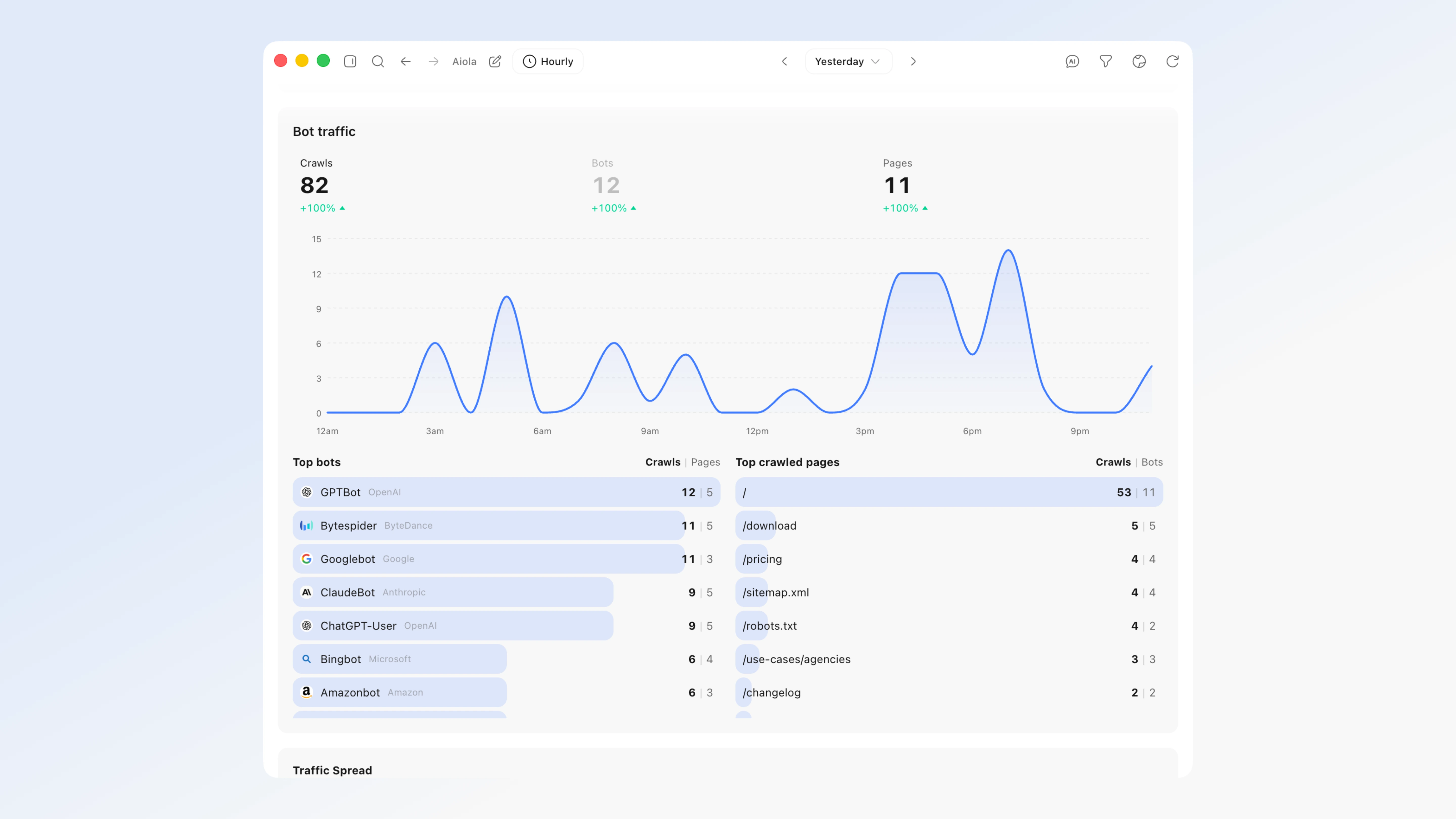
Analytics now tracks the AI and LLM crawlers your normal JavaScript analytics can never see — because bots don't run JavaScript. A new Bot traffic panel shows GPTBot, ChatGPT-User, ClaudeBot, PerplexityBot, Google-Extended, Bytespider and more crawling your pages, on the same chart and date ranges as your human visitors. It's the AEO/GEO view of who's ingesting your content for AI answers.
What's New
- Bot traffic — see which AI crawlers read your site: Analytics now tracks LLM/AI crawlers (GPTBot, ChatGPT-User, ClaudeBot, PerplexityBot, Google-Extended, Bytespider, and more) that your normal JavaScript analytics can never see, because bots don't run JavaScript. A new Bot traffic panel on the analytics page shows crawls over time on the same chart as your visitors (today / yesterday / 7d / 30d / custom — same timezone), a per-bot hover breakdown with logos, and Top bots + Top crawled pages lists (click a bot to see exactly which pages it crawled). It's powered by a lightweight server-side capture you add via Settings → Analytics → Add to App (works for any stack — Next.js, Nuxt, Express, Python, Rails, PHP, or an edge/CDN worker). The data also flows into the aiola MCP (
get_analytics + the overview recap) and the analytics Analyze button, so AI recaps now cover how assistants discover your site (AEO/GEO).
Fixes
- The Aiola MCP server no longer breaks after an update: Some installs hit a "failed to reconnect" /
-32000 error where the built-in Aiola MCP tools (app logs, analytics, feedback, search keywords, indexing) went dark and /mcp reconnect kept failing. The underlying generated server file could be shipped with a syntax error and silently take the MCP offline for everyone. It's now hardened so this can't recur: the server script is validated at build time (a broken script fails the build instead of shipping), it's written to disk atomically with an automatic fall-back to the last working copy, and it now launches on Aiola's own bundled runtime — so the MCP keeps working even on machines without Node installed, and stays working across restarts and version updates. - Thread search now jumps to the exact message — and reaches every thread: Picking a result in the Found in threads group used to just open the thread and drop you at the bottom; now it scrolls straight to the matching message and briefly highlights it, so you land on the thing you searched for. Search also covers every thread's title and summary across all your threads (not just the most recent ones), so a match can't hide just because the thread scrolled out of the recent list.
June 17, 2026 · v0.1.70
A search-and-fix release. Analytics gained an Indexing panel that pulls the real "why pages aren't indexed" reasons from Google Search Console and Bing for your project's site — and a Fix with AI button that hands the whole list to chat. The command palette now searches inside the contents of every thread, not just titles. Generate summary also works again across every provider.
What's New
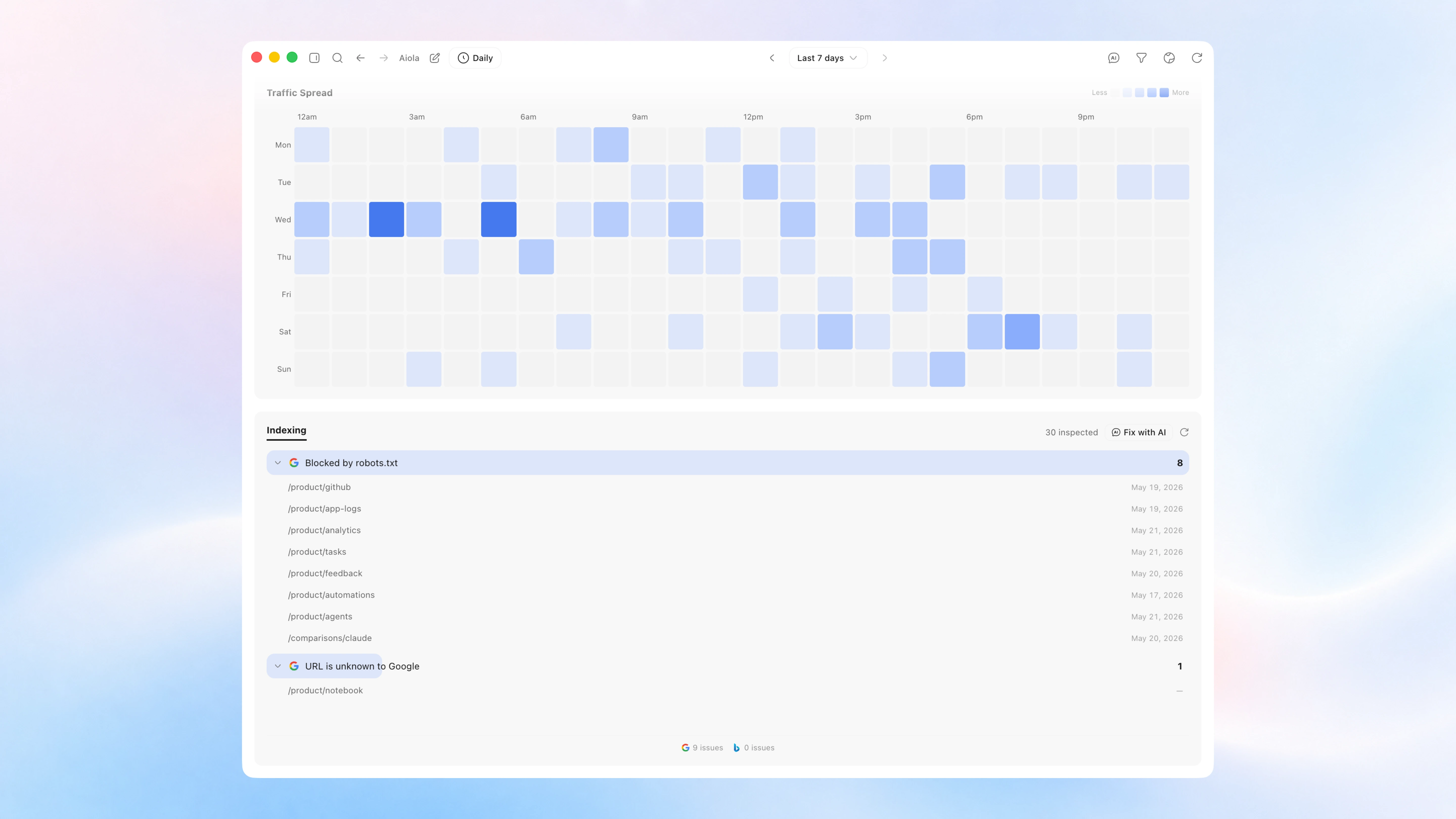
- See why your pages aren't getting indexed — and fix them: A new Indexing panel at the bottom of Analytics shows the "why pages aren't indexed" reasons straight from Google Search Console (plus Bing crawl issues) for the site connected to your project. Issues are grouped by the exact reason —
noindex, 404, redirects, crawled-but-not-indexed, robots-blocked, whatever the engines actually report — each with the affected URLs and when they were last crawled. It inspects your sitemap in the background and fills in live (so even sites with thousands of URLs keep building up), then caches the result so it's instant next time. Hit Fix with AI to send the whole list to chat — the agent finds the shared root cause and fixes it, and you can tailor exactly what it does in Settings → Instructions → Indexing Fix. - Search inside your threads: The command palette (⌘K) now searches the contents of every thread in the current project — not just titles. Type a couple of letters from something you remember saying or doing, and matches show up under a new Found in threads group with a highlighted snippet of the message; hit it to jump straight to that thread. It's scoped to the project you're in (so you find it where you remember building it), updates as new threads come in, and stays fast and out of your way while you type.
Fixes
- Generate summary works again: The per-thread Context panel's Generate summary could silently do nothing in the packaged app — it ran a fixed model that not every provider offers (Cursor rejected it outright, others hit a quota tier), so the request came back empty and the panel never updated. Summaries now run on the same model and provider the thread is already using, so Generate and Regenerate produce a real recap across Claude, Codex, and Cursor.
June 15, 2026 · v0.1.60
A big writing-and-organizing release. Plan, Notes, and Todo are now three modes of one Notebook surface, a Quick Note scratchpad is one keystroke away on every page, chat threads gained a per-thread Context panel, and you can hand a running thread between Local and a Worktree. The Canvas also picked up a full whiteboard, and voice notes landed in chat.
What's New
- Notes: an Apple-Notes-style writing surface alongside Plan. A note list with search and pinning on the left (grouped by date), the same block editor you know from Plan on the right, with the chat pane wired in. Per-workspace, stored locally under
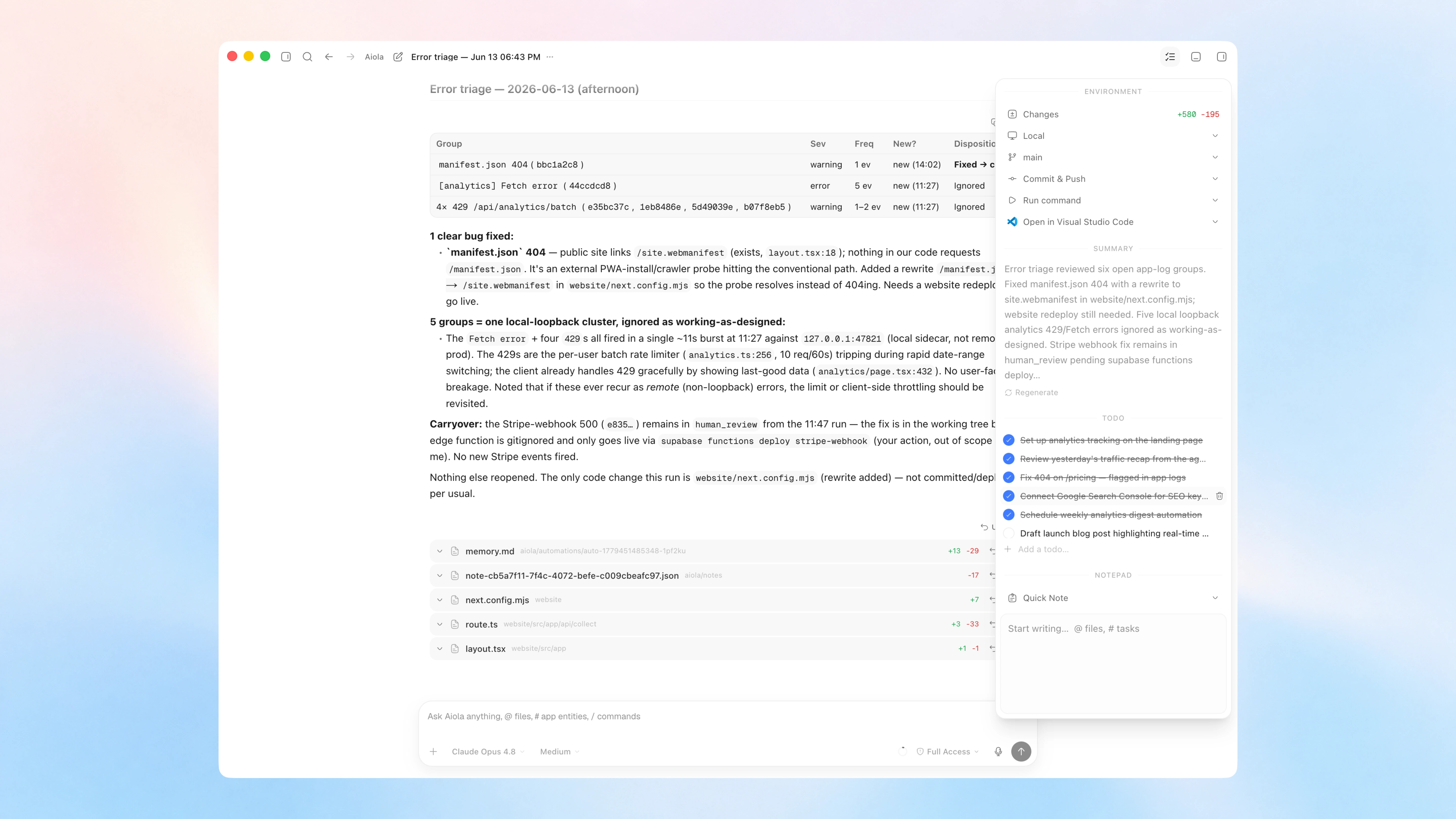
aiola/notes/. Plan, Notes, and Todo are now modes of one Notebook surface — switch between them with a segmented control in the header - Todo: a third Notebook mode: a single per-workspace checklist. Just start typing — every line is a checkable item, press Enter for the next one, and check things off as you go (shift-click a checkbox to toggle a whole range at once). Hide or clear completed items to stay focused. Stored locally under
aiola/todos.json, with the chat pane wired in so the agent can add or check off to-dos for you - Quick Note (floating scratchpad): a scratchpad one keystroke away on every page of every workspace. Toggle it with ⌘⇧J (Ctrl+Shift+J) or from the command palette. It's the same block editor in a compact frame, so formatting and checkboxes just work — and you can drag it to any of nine slots (corners, edges, or centered)
- Notebook chat knows your notes:
#note-mention any note to pull it into a chat turn, and let the agent create, append to, and read notes directly while it works, so a conversation can spin up or update a note without leaving the composer - Per-thread Context panel: every chat thread gets a Context button in its header that opens a side panel with a Notepad and a Changes view, each kept separately per thread. The Notepad reaches your whole workspace: open any note, switch between them, or start a new one right from the panel — the same notes you write in the Notebook
- Reworked side panel: the dashboard side panel now opens to an empty-state picker — Review, Terminal, Browser, or Files — so you choose what to open instead of it defaulting to a view. Toggle the panel with ⌘E; the views have their own shortcuts (Review ⌃⇧G, Browser ⌘T, Files ⌘P). Those view shortcuts now only open and focus their tab — pressing one again keeps it open instead of toggling it closed, and pressing a view's shortcut from another tab jumps straight to it
- Hand off a running thread between environments: once a thread has started you can move it between Local and a Worktree from the environment selector. The handoff stashes the working tree, materializes (or removes) the worktree, and re-applies your changes on the other side, so you can switch where a conversation runs without losing work
- Canvas whiteboard: sketch right on the Canvas dashboard: shapes, arrows, text and sticky notes, a freehand pen, and an eraser, layered beneath your terminal/browser/chat/image/file cards. Drag, resize, and rearrange anything, and pick a background to taste
- Bigger canvas panels: terminal, browser, chat, image, and file cards now open noticeably larger by default (terminals jump from 600×400 to 820×560), so there's real room to work the moment a panel appears. Minimum sizes scaled up to match, and "arrange" tiling uses the new dimensions
- Voice notes in chat: dictate straight into the composer. Tap the mic and a recording pill appears instantly with a live waveform and timer; stop to transcribe, or cancel to discard. No API key to configure — transcription rides on your existing ChatGPT sign-in through Codex
Improvements
- The Quick Note has its own spot in the command palette and a dedicated keybind, and its position — any of nine slots (corners, edges, or centered) — lives in Appearance settings
- Canvas dragging, resizing, and sketching stay smooth with many panels and shapes on screen, and a selected panel now shows a rounded highlight that matches its card
- App Logs gained an Ignored group: muted issues collapse into their own collapsible section instead of cluttering the active list, and bulk shift-select reaches across the Active, Closed, and Ignored sections
- Arrowing through
@-mention and command suggestions now keeps the highlighted row scrolled into view, so keyboard navigation never runs off the bottom of the popup - The sidebar's Notebook entry stays highlighted whether you're on Plan, Notes, or Todo, since they're one surface
- The analytics "Online" pulse dot now only appears when at least one visitor is live, instead of pulsing next to a zero
Fixes
- Terminal history persists and is shared: Terminals now read and write your real shell history, so arrow-up recalls commands from your other terminals — including a new tab, or the app reopened the next day — instead of starting blank each time
- Login no longer locks itself out: A dead refresh token used to make the app hammer Supabase's
/token endpoint from several places at once (auto-refresh timer, Realtime reconnect, and every authed query retrying independently), tripping a per-IP rate limit that then blocked even a fresh Google/OTP sign-in. A client-side circuit breaker now bounds refresh traffic: terminal failures purge the session and open the breaker, bursts short-circuit without hitting the network, and any successful new sign-in resets it. Only refresh-token calls are guarded, so a fresh login always passes through
June 1, 2026 · v0.1.50
The biggest release yet. Cursor Agent joins Claude and Codex as a fully supported provider, you can clone any Git repo straight into a new workspace, and provider and model management got a dedicated home with live usage for Codex and Cursor.
What's New
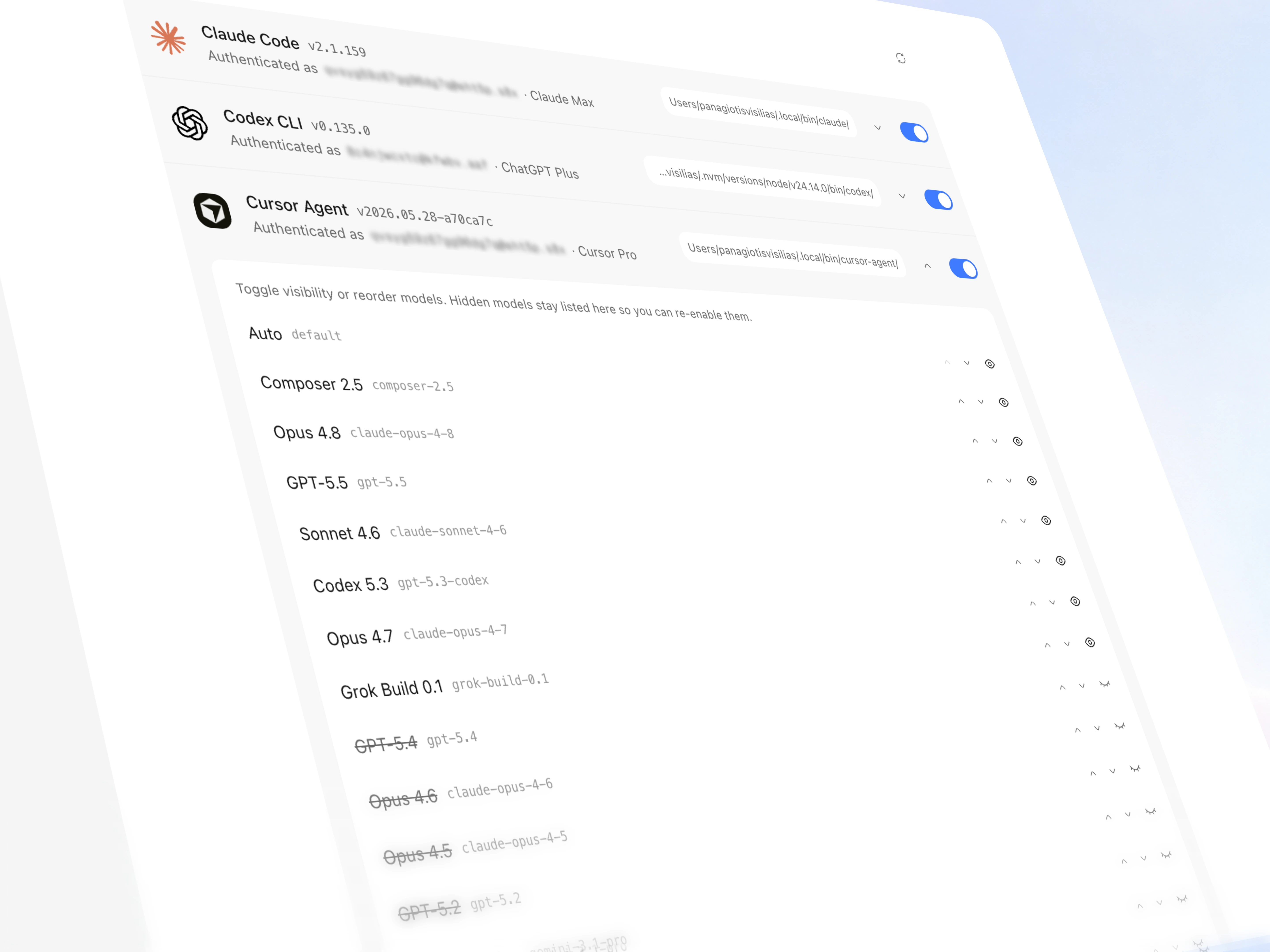
- Cursor Agent support: Cursor joins Claude and Codex as a first-class coding provider. Install
cursor-agent, sign in, and pick Cursor models right in the composer. Permission modes map cleanly (read-only → plan, supervised → ask, full access → agent), and Aiola's MCP tools are wired in automatically so Cursor sessions get the same toolset as your other agents - Clone from a Git repo: the Open Workspace screen can now clone GitHub, GitLab, or any Git URL straight into a new workspace. Signed in to the
gh CLI? Browse and filter your own GitHub repos and clone with one click — no URL pasting - Providers settings page: a dedicated page to manage every provider in one place: enable/disable whole providers, hide models you never use, reorder how they appear in the picker, and see each provider's auth status with account email and plan tier
- Live Codex usage: usage now reads live from Codex's servers instead of stale local snapshots, so rate-limit and credit status in Settings reflect reality in real time
- Cursor usage card: see Cursor's plan tier, rate limits, and credit balance alongside your Claude and Codex usage
- Default Fast Mode: set a per-workspace default for Fast Mode on any model that supports it; the option hides itself automatically on models that don't
Improvements
- Automations use a provider → model drill-down picker instead of a flat list, so models that share a name across providers (e.g. GPT-5.5 on both Codex and Cursor) are never ambiguous
- Workspace settings handle provider and model switches coherently — picking a provider auto-selects its first model, and switching models drops now-invalid reasoning/fast-mode defaults instead of silently keeping them
- CLI update banner is friendlier: "Recommended" rather than "Required", a "Later" button to dismiss a specific update, manual "Restart now" so updates never kill a running automation, and a re-check every 30 minutes for long-lived sessions
- Terminals force-kill their whole process tree on close, so dev servers and other children spawned in a terminal no longer linger as orphans
- The Local dev-servers panel only lists real dev servers now, ignoring the random high (ephemeral) ports the OS hands out to internal helpers
- Your open files and active tab in "All files", and the diff viewer's tree/view mode, survive switching workspaces or jumping to the central dashboard and back
- The sidebar home button returns you to the last central page you were on instead of always going to the start
- Drag a file onto the terminal pane to attach it
- Sensitive values (tokens, secrets) render redacted in the UI while staying one-click copyable
Fixes
- Model picker and automations now store the provider alongside the model slug, so older automations whose slug exists under multiple providers resolve to the right one
- Dragging a file onto chat or a terminal no longer attaches it twice or spawns a stray image tile
- Switching the active file no longer briefly shows the previous file's contents under the new path
- Cursor's available models, fast-mode support, and reasoning levels are auto-probed and refreshed on Re-check
- Cursor's MCP integration is approved automatically and scoped to the project via
.cursor/mcp.json, so tools load without a manual approval step git add / git restore retry on transient index.lock contention instead of failing outright- Update checks filter out transient network errors (network changed, internet disconnected) so sleep/reconnect cycles stop polluting app logs
May 24, 2026 · v0.1.40
A focused fix release. The diff viewer no longer locks up on binary files, deleting plans behaves predictably, the tasks board picked up real keyboard shortcuts, and dialogs and notifications feel less fiddly.
Fixes
- Diff viewer no longer freezes on untracked binary files (images, fonts, PDFs, etc.)
- Plan page: deleting the last plan now resets cleanly to a fresh "default" instead of leaving stale items behind; renaming is allowed on any plan
- Tasks board: Backspace/Delete removes selected cards, and Cmd/Ctrl+Z undoes a deletion, Cmd+Shift+Z / Cmd+Y redoes
- Dialogs: Esc reliably closes them, and the first input/textarea is auto-focused on open — Enter submits without hunting for the button
- App-log notifications re-surface (unread + fresh timestamp) when a group gets new events, instead of being silently dedup'd
- macOS tray icon falls back to alternate asset paths if
logo-nb.png is missing, so the tray reliably appears
May 21, 2026 · v0.1.3
This release made the workspace layout more flexible and the analytics view more accurate. Review, Browser, and Terminal now share one panel, workspaces gained a default permission mode, and several analytics and task issues were fixed.
New
- Default Mode for workspaces: pick the permission mode that new threads start in, right from Settings
- Terminal placement: move the terminal into the side panel as its own tab, or dock it back to the bottom; the choice is remembered and there's a new toggle for it in Appearance settings
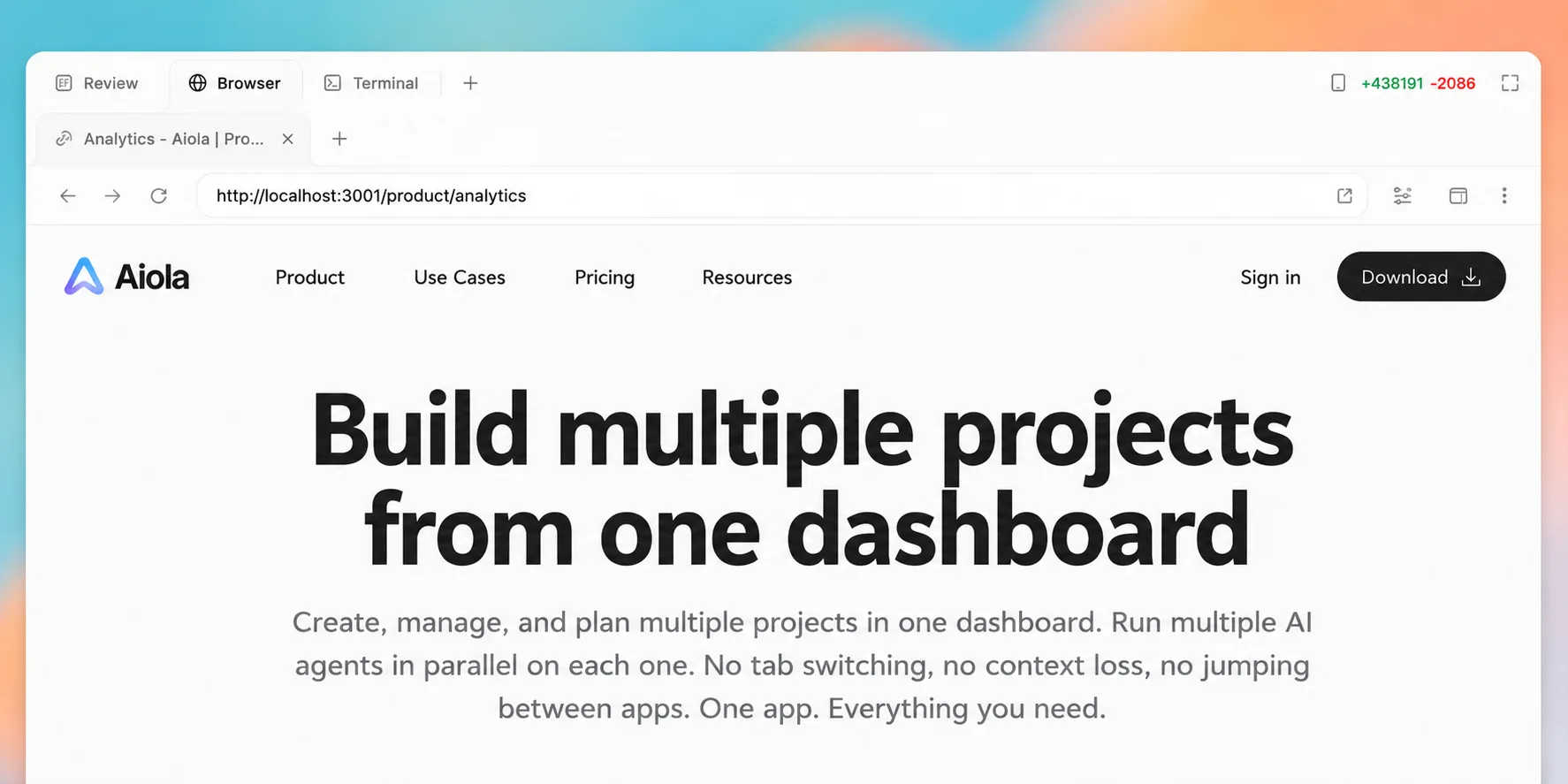
- Unified side panel: Review, Browser, and Terminal now live together in one panel, with the selected tab kept as you switch threads or pages
Fixes
- Analytics revenue chart now lines up correctly — the bars and the revenue axis use the same scale, so the numbers match what the tooltip shows
- Analytics Top Pages now includes Bing page data alongside search keywords
- Tasks chat panel no longer leaves buttons clickable while the agent is running
- Tasks created from chat now pick up your workspace's default model, so they can be triggered right away
- New threads start in your workspace's Default Mode instead of always defaulting to supervised
- Logging out now reliably clears your session so the app doesn't silently sign you back in
May 16, 2026 · v0.1.2
This release concentrated on reliability. It improved workspace boundaries for terminal and agent integrations while removing a few performance issues that could lock up the renderer.
Fixes
- Improved terminal isolation so commands run inside your workspace use your project's own configuration
- Tightened agent and CLI integrations (Claude Code, Codex, git, gh, MCP, IDE launchers) for cleaner workspace boundaries
- Fixed the renderer freezing at 100% CPU on threads with large command output or unusual code — oversized blocks now render as plain text instead of locking up
- File diffs no longer reload when switching theme
- Browser tab snapshots no longer pin the renderer — snapshotting is now deferred and throttled
May 15, 2026 · v0.1.1
The second release focused on day-to-day usability: better browser behavior inside Aiola, clearer workspace defaults, and smoother task and canvas interactions.
What's New
- Browser pane upgrades:
target=_blank and window.open now open as new sub-tabs instead of replacing the page, with a proper right-click menu (Back / Forward / Reload / Inspect) and a per-webview DevTools shortcut - Local dev server detection: empty-state lists running localhost servers in your workspace with one-click open or kill
- Clear cookies & cache: wipe the canvas browser session without restarting the app
- Approval toasts: OS notifications now fire for new
awaiting_input approvals (respects your notification settings) - Zoomable attachments: click images in chat, task cards, and create dialog to expand them
- Kanban headers: sticky column header with status icon, count, and an inline "+ New task" tile at the top of each column
- Smarter workspace defaults: new workspaces auto-seed their default model (prefers Codex gpt-5.5 when installed, falls back to Claude Opus)
Improvements
- Reload shortcuts (Cmd/Ctrl+R, F5) reload the focused browser sub-tab instead of the whole app window
- Task create dialog respects the workspace default model (no more accidental Claude Opus when your default is Codex)
- Worktree deletion no longer races the server — fixes the spurious "is not a working tree" toast
- Slash-command trigger only fires at word boundaries —
test/ stays plain text, /model and /reasoning high still work - Shared diff panel snaps to 70% width on open
- Composer layout fixed when the message list is hidden
- Silenced harmless
ERR_ABORTED webview console noise - Canvas-browser guests skip Aiola.init so their errors stop being reported as ours
- Realtime analytics fetches visitors + events in a single combined query and dedupes inflight refetches
- Branch cache falls back to the root entry for subworktrees, avoiding empty-state flashes
May 13, 2026 · v0.1.0
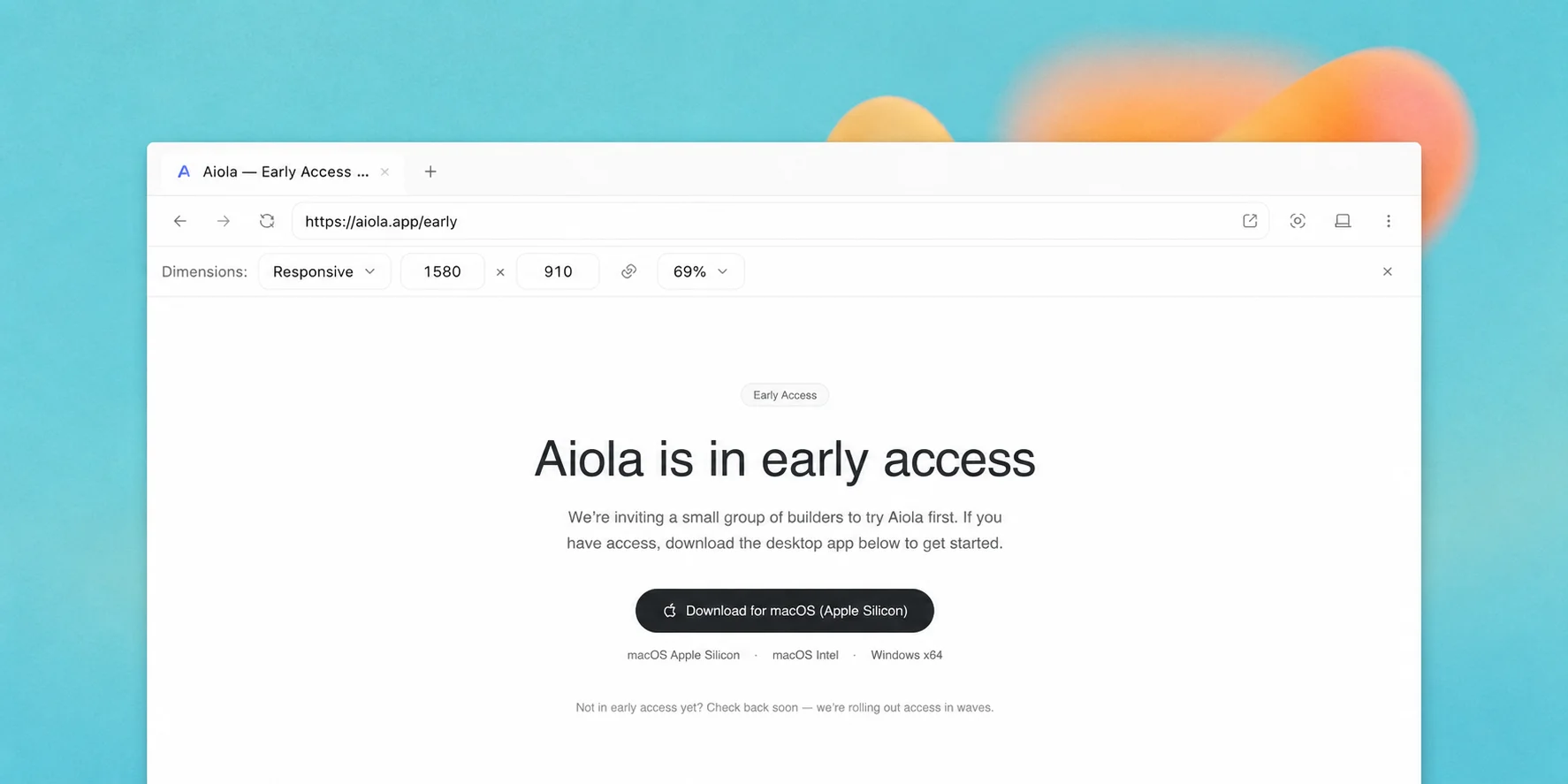
Aiola entered early access for users on May 13, 2026. This was not the public launch. It was the first release we shared with early users as the foundation for an agentic workspace across multiple software projects.
Details
- Agentic by design: We are focusing Aiola on agents as the center of the experience. They should feel like part of the app. The app should feel like the place where project work happens.
- One place for every project: The goal is to make Aiola the one place for all of your projects. We want one app for analytics, GitHub, coding and the other tools your workflow depends on. That would reduce switching between apps for different projects.
- Codex and Claude: Aiola is built around Codex and Claude. Users will need their own subscriptions for the providers they use inside the app. That keeps familiar models at the center of the experience. One workspace brings them together.